Posts

Ticket: Outlook 2007 Client Crashing when connecting to exchange 2010 mailbox

      Outlook crashing after Exchange 2010 Upgrade Outlook 2007 Client Crashing when connecting to exchange 2010 mailbox

REF: Exchange 2010 migration from Exchange 2003

    Upgrade Exchange 2003 to Exchange 2010 - Part II

Failover Cluster – Allow clients to connect through this network

Image
  How can you change the DAG Cluster address - It has picked up the wrong DHCP adddress...

LAB: Move Mailbox from legacy mailbox Steps

Image
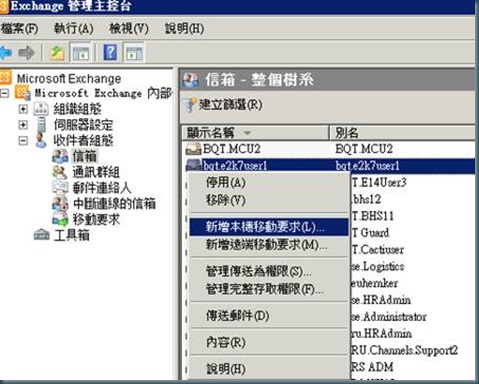
1. New Local Move Request 2. Browse target mailbox database 3. Select target mailbox 4. Next steps 5. Process new move request 6. New move request completed 7. View move request Move task completed 8. Clean completed move request 9. Click yes to process clean move request 10. Move request cleanned. 11. Then user can start to use outlook now.

LAB: How to reconnect mailbox to exist account

Image
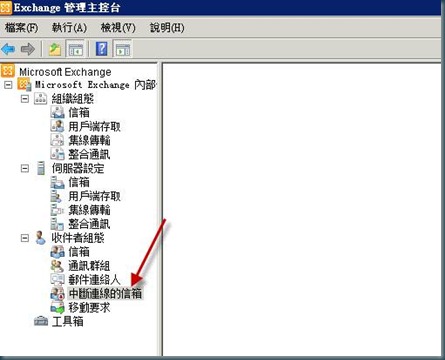
How to reconnect mailbox to exist account 1. 請先確認下列 disconnected mailbox 中是否有被刪除的信箱 2. 若沒有,請開起 EMS (Exchange mamagement shell) 執行下列指令 get-mailboxdatabase –server Server01 | clean-mailboxdatabase get-mailboxdatabase –server Server02 | clean-mailboxdatabase 3. 接著重新refresh steps 1 的畫面,約等3-5 mins 4. 被刪除的信箱產生 5. 按右鍵連線 6. 連線信箱 7. 瀏覽現有的使用者 (請找一個或新建立一個不含信箱的AD 帳號) 8. 沒有信箱的AD account 才會列入 9. 輸入相關資訊 10. 進行連線 11. 連線完成 12. 等15 mins 後再從Outlook or Webmail 登入這個AD account 取出郵件即可

LAB: Windows Server 2008 取得Failover Cluster log

Image
Windows Server 2008 取得Failover Cluster log 1. 取得Failover Cluster log,登入其中一台Exchange DAG member 2. 開啟command Line 輸入CLUSTER LOG /GEN /COPY:"c:\cluster.log" 3. 會產生兩個記錄檔

Ref: Transitioning an Exchange 2007 environment to Exchange 2010

  MS ExchangeTeamBlog http://msexchangeteam.com/archive/2009/11/20/453272.aspx   Transitioning an Exchange 2007 environment to Exchange 2010 When you are ready to begin transitioning your organization to Exchange 2010, you must transition the "Internet Facing AD Site" that is associated with your external Autodiscover record, then regional Internet facing AD Sites, and then transition your internal Active Directory sites. It is not supported to transition an internal Active Directory site before all your Internet-accessible sites have been transitioned. The steps for introducing Exchange 2010 into the environment are: Note: These steps do not discuss how to set up your CAS2010 servers in a load balancing array. Please review your load balancing solution's instructions for how to properly create and join your CAS2010 servers in a load balancing array. 1. In order to support external client coexistence with CAS2010 and legacy Exchange in your "I...