Posts

Issue: Exchange 2010 CAS NLB configuration - netsh

Image
    Balancing Act: Dual-NIC Configuration with Windows Server 2008 NLB Clusters Configuring NLB for Exchange 2010 CAS Load Balancing Next Steps Before you start using your new NLB cluster for CAS functionality, you should complete two final tasks.  First, IP forwarding should be enabled on each cluster member’s NLB LAN NIC.  By default, Windows 2008 disables IP forwarding, which causes problems with NLB.  IP forwarding enabled allows, from an NLB perspective, requests sent from one NIC to be sent out the other.  IP forwarding can be enabled on your NLB LAN NIC by running netsh interface ipv4 set int “NLB LAN” forwarding=enabled from a command prompt.     netsh interface show int That will show you the interfaces in the server.  Find the name of the cluster NIC and put it in quotes in the following command: ne tsh interface ipv4 set interface "Cluster NIC" forw...

Ticket: Exchange 2010 mailbox account self permission

Image
    Correct self permission incorrect self permission

LAB: Exchange 2007 OWA http redirect to https

Image
   

Ticket: Outlook 2007 Client Crashing when connecting to exchange 2010 mailbox

      Outlook crashing after Exchange 2010 Upgrade Outlook 2007 Client Crashing when connecting to exchange 2010 mailbox

REF: Exchange 2010 migration from Exchange 2003

    Upgrade Exchange 2003 to Exchange 2010 - Part II

Failover Cluster – Allow clients to connect through this network

Image
  How can you change the DAG Cluster address - It has picked up the wrong DHCP adddress...

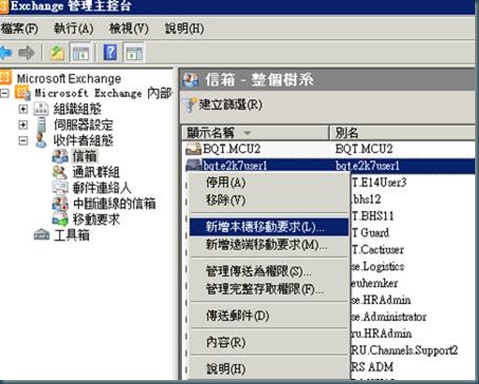
LAB: Move Mailbox from legacy mailbox Steps

Image
1. New Local Move Request 2. Browse target mailbox database 3. Select target mailbox 4. Next steps 5. Process new move request 6. New move request completed 7. View move request Move task completed 8. Clean completed move request 9. Click yes to process clean move request 10. Move request cleanned. 11. Then user can start to use outlook now.