Posts

REF: E14 Outlook Provider

Image
  Exchange 2010 Set-OutlookProvider http://technet.microsoft.com/en-us/library/bb123683.aspx The Set-OutlookProvider cmdlet creates the global settings for the Autodiscover service. It sets the AutoDiscoverConfig object under the Global Settings object in Active Directory and sets the attributes specified in the parameters listed in the Parameters section. The Autodiscover Service and Outlook Providers - how does this stuff work? http://blogs.technet.com/b/exchange/archive/2008/09/26/3406344.aspx By default three Outlook Providers are used to configure settings individually for Exchange RPC protocol or internal clients ( EXCH ), Outlook Anywhere ( EXPR ) and WEB . The EXCH setting references the Exchange RPC protocol that is used internally. This setting includes port settings and the internal URLs for the Exchange services that you have enabled. The EXPR setting references the Exchange HTTP protocol that is used by Outlook Anywher...


REF: E14 - 在 Active Directory IP 站台連結上設定 Exchange 成本

http://technet.microsoft.com/zh-TW/library/bb266946.aspx [PS] C:\Windows\system32>Get-AdSiteLink Name                      ADCost     ExchangeCost    Sites ----                      ------     ------------    ----- ROOT-BQA                  100                        {corp.com/Configuration/Sit... ROOT-BQC                  100             ...

REF: E14 - 啟用或停用收件者篩選

Image
啟用或停用收件者篩選 http://technet.microsoft.com/zh-TW/library/bb125187.aspx RunspaceId                 : e041d2f5-ee6f-4e7b-b9b8-63ebc9cd2fc4 Name                       : RecipientFilterConfig BlockedRecipients          : {} RecipientValidationEnabled : False BlockListEnabled           : False Enabled                    : True ExternalMailEnabled        : True InternalMailEnabled        : False AdminDisplayName       ...

REF: E14 Set-TransportConfig -ExternalPostmasterAddress

Image
    Set-TransportConfig -ExternalPostmasterAddress postmaster@contoso.com 設定外部郵件管理員地址   http://technet.microsoft.com/zh-TW/library/bb430765.aspx 您可以設定及管理外部郵件管理員地址。外部郵件管理員地址是用來做為系統產生之郵件與通知的寄件者,並將這些郵件和通知傳送給位於 Microsoft Exchange Server 2010 組織外部的郵件寄件者。外部寄件者是指其電子郵件地址包含的網域,未定義在 Exchange 2010 組織之公認的網域清單中的任意寄件者。 在 Exchange 2010 中,可藉由   Set-TransportConfig   指令程式中的   ExternalPostmasterAddress   參數控制外部郵件管理員地址的組態。在 Exchange Server 2007 中,您可以在每部執行 Exchange 2007 的電腦 ( 已安裝 Hub Transport server role 或 Edge Transport server role) 上使用   Set-TransportServer   指令程式設定此參數。 重要事項: 由於在 Exchange 2010 中已變更外部郵件管理員地址的管理方式,因此如果您的組織中同時存在 Exchange 2010 和 Exchange 2007 伺服器,則必須在兩個位置設定外部郵件管理員地址。您需要為 Exchange 2010 環境設定一次外部郵件管理員地址以及 Exchange 2007 環境的每個伺服器設定一次。 依預設,每部 Hub Transport Server 和 Edge Transport Server 上的   ExternalPostmasterAddress   參數值均設定為   $null   值。 $null   值會導致...

Ticket: E14 New Mailbox Seasrch (Enable Discovery Mailbox)

Image
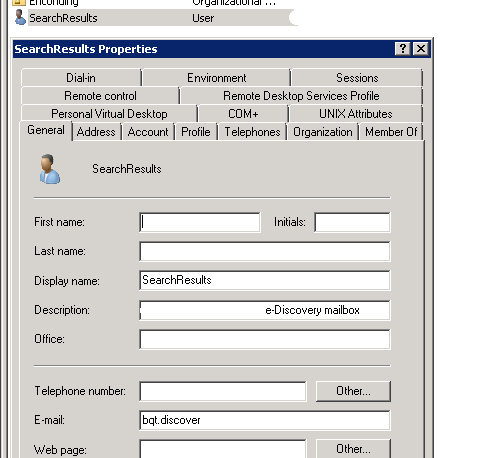
New Mailbox Seasrch (Discovery Mailbox) http://social.technet.microsoft.com/Forums/en-US/exchange2010/thread/290ebc15-e30a-4636-98f9-3b61c75e41b0/ http://terenceluk.blogspot.com/2011/08/moving-exchange-2010-mailbox-with-new.html http://technet.microsoft.com/en-us/library/gg588318.aspx http://help.outlook.com/zh-tw/140/ms.exch.ecp.EditMailboxSearch_SearchQuery.aspx Unable to execute the task. Reason: The Discovery mailbox, a hidden default mailbox that is required to search mailboxes, can't be found. It may have been inadvertently deleted. The mailbox must be re-created before you can search mailboxes. Enable-Mailbox -Arbitration -DomainController <FQDN of root global catalog server> -Identity "SystemMailbox{e0dc1c29-89c3-4034-b678-e6c29d823ed9}" [PS] C:\>Enable-Mailbox "SystemMailbox{e0dc1c29-89c3-4034-b678-e6c29d823ed9}" -Arbitration -DomainController rdc11.corp.com ...

LAB: E14 Multi Mailbox Search (eDiscovery)

Image
多信箱搜尋 管理多信箱搜尋 將使用者新增至探索管理角色群組 建立探索搜尋 啟動或停止探索搜尋 修改探索搜尋 移除探索搜尋 建立探索信箱 使用信箱搜尋刪除郵件 重新建 立探索系統信箱 Add a User to the Discovery Management Role Group http://technet.microsoft.com/en-us/library/dd298059.aspx 建立探索信箱 http://technet.microsoft.com/zh-TW/library/dd638177.aspx Add-RoleGroupMember –Identity "Discovery Management" –Member "Discovery Member" An error occurred when searching Johnny Yao. The message is 'Search Failed on mailbox 'MSFT\Johnny.Yao\14929ce5-78b3-4414-bf9a-2177290c1355'. If the search query used short words with wildcard(s) such as pat*, it can result in a large number of words or phrases because all permutations of words starting with " pat " are searched. Make search queries as specific as possible when using wildcards. '. http://social.technet.microsoft.com/Forums/eu/exchange2010/thread/2f69e330-96c8-4ea9-b1dd-78a97ec29e5a Based on my research, I suggest you ...

Ticket: Exchange 2010 群組委派設定

請教一下,在 Exchange 2010 中的全球通訊清單中的群組,是否可以委派? 指派有權限的 user ,可以將人員名單加入 / 移除適當的群組中,但是不能變更群組管理員, 也不能異動 ( 如更名 ) 或刪除群組! 需求為公司內部有很多專案與業務行為,同仁想依不同的需求,建立專屬的全域通訊群組, 以方便聯絡不同的人 ( 跨部門 ) ;但是這會增加很多 IT 的工作,所以才想要諮詢這個部份, 是否可以委派給一般 usre 自行加入 / 刪除通訊群組成員,但是不能刪除群組。   解決方式 :   ============================================== Part 1 使用者及群組設定 ============================================== 您的需求可參考下列流程進行設定 1. 建立新的 DL - DistributionGroup ( 也就是通訊群組,群組型態有分 Distributio or Security)    New-DistributionGroup -Name "Group1" -OrganizationalUnit "MSFT.corp.com/Users" -SamAccountName "Group1" -Type "Security" -DisplayName "Group1" 各參數可參考下列網址 http://technet.microsoft.com/zh-tw/library/aa998856.aspx 2. 接著設定這群組的管理者或多個管理者,為方便可包含管理者所使用的帳號 Set-DistributionGroup -Identity "Group1" -ManagedBy "User1" 詳細設定可參考 http://technet.microsoft.com/en-us/library/dd638201.aspx 3. 接著加入群組成員 Add-Distri...