Posts

LAB: Deploying Exchange 2010 DAG - Part 3 – Manage DAG
Image
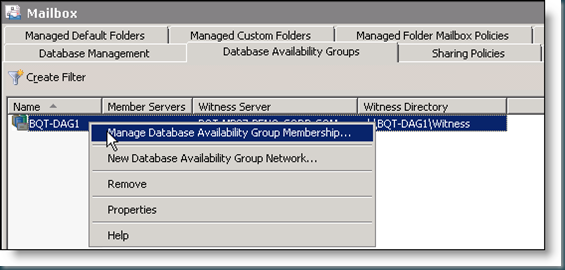
  Manage Database Availability Group Membership Summary: 2 item(s). 1 succeeded, 1 failed. Elapsed time: 00:01:53 BQT-E14CAS1 Completed Warning: Insufficient permissions to access file shares on witness server 'BQT-MB07'. Until this problem is corrected, the database availability group may be more vulnerable to failures. You can use the Set-DatabaseAvailabilityGroup cmdlet to try the operation again. Error: Access is denied Exchange Management Shell command completed: Add-DatabaseAvailabilityGroupServer -Identity 'BQT-DAG1' -MailboxServer 'BQT-E14CAS1' Elapsed Time: 00:01:27 BQT-E14MBS1 Failed Error: There was a problem changing the quorum on cluster BQT-DAG1. File share witness '\\BQT-MB07.\BQT-DAG1.network name was not found. This may be due to a problem with firewall settings. Warning: The network name 'BQT-DAG1' is not online. Please check that the IP address configuration of...

LAB: Deploying Exchange 2010 DAG - Part 2 – Create NEW DAG

Image
  Create New Database Availability Groups            調整權限後的結果        Blog Extended Reading 1. LAB: Deploying Exchange 2010 DAG - Part 1 – Configure Witness 2. LAB: Deploying Exchange 2010 DAG - Part 2 – Create NEW DAG 3. LAB: Deploying Exchange 2010 DAG - Part 3 – Manage DAG 4. LAB: Deploying Exchange 2010 DAG - Part 4 – Manage DAG Network 5. LAB: Deploying Exchange 2010 DAG - Part 5 - Create Database Copies More Information & Reference 1. Deploying High Availability and Site Resilience

LAB: Deploying Exchange 2010 DAG - Part 1 – Configure Witness

Image
Configure Witness Server and Directory If the witness server you specify isn't an Exchange 2010 server, You must add the Exchange Trusted Subsystem universal security group to the local Administrators group on the witness server 1. On Witness Server 2. The following combinations of options and behaviors are available: You can specify only a name for the DAG and leave the Witness Server and Witness Directory check boxes cleared. In this scenario, the wizard will search for a Hub Transport server that doesn't have the Mailbox server role installed. It will automatically create the default directory and share on that Hub Transport server and use that server as the witness server. You can specify a name for the DAG, the witness server that you want to use, and the directory you want created and shared on the witness server. You can specify a name for the DAG and the witness server that you want to use, and leave the Witness Directory check box ...

REF: Planning Exchange 2010 DAG - Part 5 - Witness Server

Image
Important!! If the witness server you specify isn't an Exchange 2010 server, you must add the Exchange Trusted Subsystem universal security group to the local Administrators group on the witness server. These security permissions are necessary to ensure that Exchange can create a directory and share on the witness server as needed. If the proper permissions aren't configured, the following error is returned: Error: An error occurred during discovery of the database availability group topology. Error: An error occurred while attempting a cluster operation. Error: Cluster API "AddClusterNode() (MaxPercentage=12) failed with 0x80070005. Error: Access is denied." Witness Server Requirements A witness server is a server outside of a DAG that's used to achieve and maintain quorum when the DAG has an even number of members. DAGs with an odd number of members do not use a witness server. All DAGs with an even number of members will use a witness server. The witn...

REF: Planning Exchange 2010 DAG - Part 4 - Network Planning

Image
還需要E2K7 CCR 的CMS name 嗎? DAG Name and IP Address Requirements During creation, each DAG is given a unique name, and either assigned one or more static IP addresses, or configured to use DHCP. Regardless of whether you use static or dynamically-assigned addresses, any IP address assigned to the DAG must be on the MAPI network. Each DAG requires a minimum of one IP address on the MAPI network. A DAG requires additional IP addresses when the MAPI network is extended across multiple subnets. The following figure illustrates a DAG where all nodes in the DAG have the MAPI network on the same subnet. Although the cluster's IP address and network name are used internally by the system, there is no hard dependency in Exchange 2010 that these resources be available. Even if the underlying cluster's IP Address and Network Name resources are offline, internal communication still occurs within the DAG by using the DAG member's server names. However, we recommend that ...

REF: Planning Exchange 2010 DAG - Part 3 - Replication Network

Image
  Replication Network Adapter Configuration   The IP address for can be manually assigned or configured to use DHCP. If DHCP is used, we recommend using persistent reservations for server's IP address. Replication networks typically do not have default gateways, and if the MAPI network has a default gateway, then no other networks should have default gateways. Routing of network traffic on a Replication network can be configured by using persistent, static routes to the corresponding network on other DAG members using gateway addresses that have the ability to route between the Replication networks. All other traffic not matching this route will be handled by the default gateway that's configured on the adapter for the MAPI network. DNS server addresses should not be configured. The Register this connection's addresses in DNS checkbox should not be checked.   Blog Extended Reading More Information & ...

REF: Planning Exchange 2010 DAG - Part 2 - MAPI Network

Image
  Network Adapter Configuration for DAGs (MAPI Network top order and set default gateway/ Each network adapter must be configured properly based on its intended use. A network adapter that's used for a MAPI network is configured differently from a network adapter that's used for a Replication network . In addition to configuring each network adapter correctly, you must also configure the network connection order in Windows so that the MAPI network is at the top of the connection order. For detailed steps to modify the network connection order, see Modify the Protocol Bindings Order . MAPI Network Adapter Configuration The TCP/IP v4 properties for a MAPI network adapter are configured as follows: The IP address for can be manually assigned or configured to use DHCP. If DHCP is used, we recommend using persistent reservations for server's IP address. The MAPI network typically uses a default gateway , although one isn't requ...